Turn schedules into games
Bring game schedules into an editable workspace and keep official assignments connected to the games they belong to.
HUI Officials helps local officiating associations import game schedules, assign officials, manage availability and crews, fill last-minute openings, and keep game fees, mileage, billing, and payment records organized.
Start with the schedule you already have. Review the game details, build the crew, and keep responses attached to each assignment.
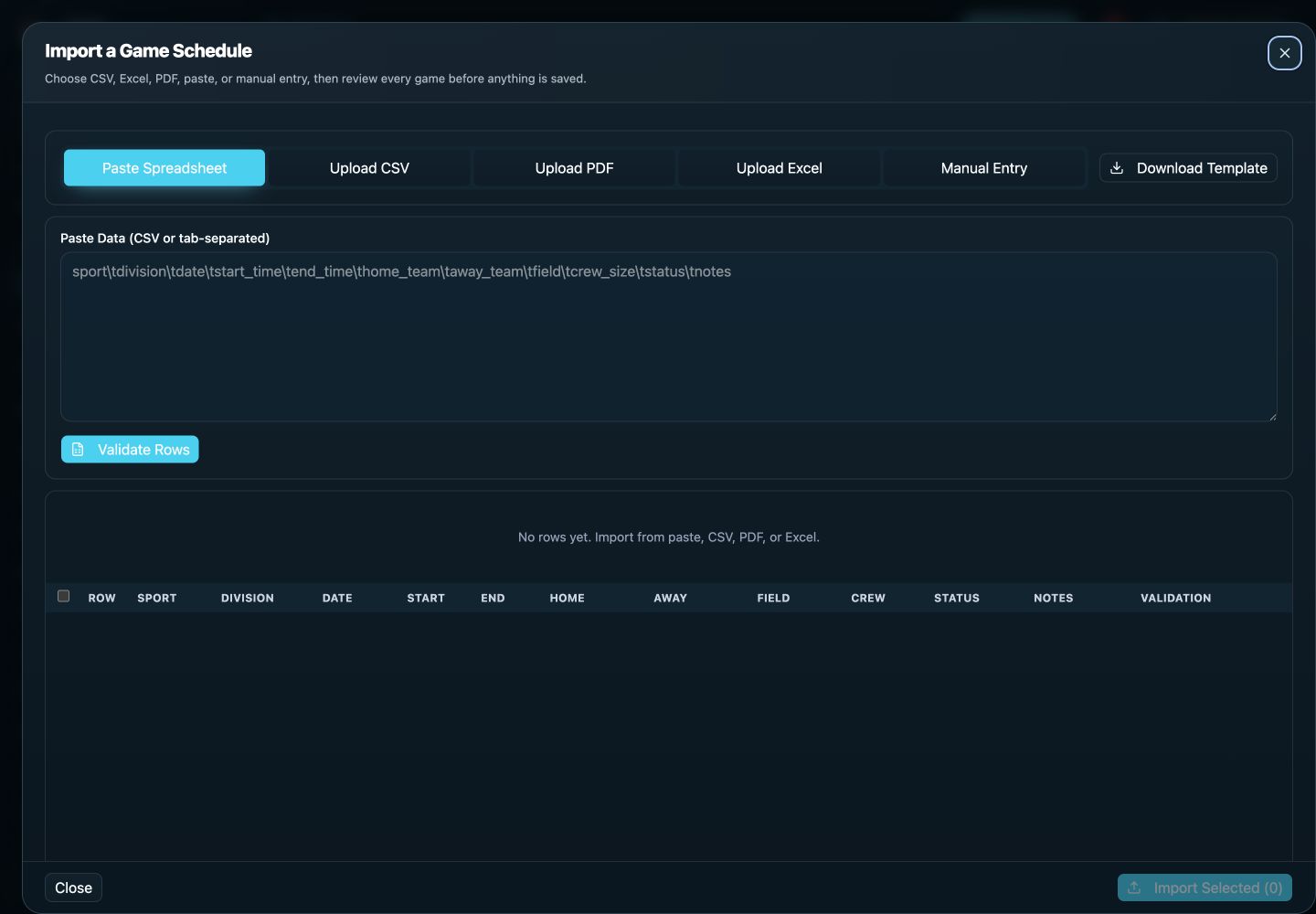
A school sends an updated spreadsheet. Import and review the dates, start times, opponents, venues, and crew requirements. Build assignments in draft, check availability and conflicts, then publish when the crew is ready. Follow pending responses from the same game records.
This checklist is an illustrative setup guide, not a customer testimonial or a measured result.
See a complete assignment example or discuss your association’s setup.
Schedules move. Availability changes. Officials turn games back. Crews develop conflicts. HUI keeps those changes connected to the same games and assignments so assigners can see what still needs attention.
Bring game schedules into an editable workspace and keep official assignments connected to the games they belong to.
Use official availability, eligibility, conflicts, and crew requirements when assigning games.
Keep a turnback visible, choose an eligible replacement official, and publish the reassignment from the same game.
Track crews, payors, game fees, mileage, billing, and payment information from the same assignment data.
HUI supports schedule intake from CSV, Excel, and PDF files with a review step before games are published. Assigners can confirm dates, start times, sports, divisions, opponents, venues, fields, notes, and required positions while the schedule is still editable. That review matters because an imported schedule is only useful when it becomes a reliable game record.
Once the games are ready, the assignment board shows open positions, assigned crews, and response state. Officials maintain availability, while sport eligibility, configured positions, and overlap checks help the assigner understand who can work. Assignments can be made manually or with Auto Assign; the assigner retains control of the crew and publication decision.
Publishing sends eligible assignment notifications while drafts remain quiet. Officials can accept or decline from the responsive HUI experience, and secure email action links can support a direct response. Assigners see which positions are accepted, which are pending, and which need a replacement instead of reconciling replies by hand.
Reminders focus on pending responses for active games. When an official declines or turns back a game, the opening stays visible and a replacement can be published without discarding the rest of the crew. Crew positions and current response state remain connected to the original game.
Meaningful game changes also stay with that record. A location, time, or schedule update does not require rebuilding the assignment. Postponed games retain their crew, while accepted officials receive relevant changes through the organization's configured notification channels.
Officials can review assignments, positions, crew visibility, venue details, notes, and notifications from a responsive progressive web app. That mobile workflow helps with last-minute replacements and field or time changes because the assignment and current game information are not split across multiple systems.
After the game, HUI can carry the same underlying records into game fees, mileage, billing, payment records, and reports. Mileage remains optional at the organization level and follows the HUI's configured policy and assignment eligibility. Captured travel and calculation facts remain attached for auditability rather than being silently rewritten when an address or rate changes later.
The result is broader than a calendar. HUI is officials scheduling software for associations that want schedule intake, assignment decisions, responses, reminders, replacements, crew communication, game changes, financial records, and reporting to share one source of game truth.
Evaluate a complete week: schedule import, availability, position eligibility, overlapping assignments, responses, replacements, and fees. Ask to see how a late change reaches accepted officials and how a postponed game keeps its crew.
Yes. HUI supports CSV and Excel schedule intake as well as PDF files. Review imported rows and resolve missing or incorrect game details before saving; keep your original schedule for comparison.
Review current HUI pricing against your association size and season needs. Include the time your assigners spend reconciling responses and changes, and confirm the plan details before choosing.
Built for baseball, softball, football, flag football, soccer, basketball, volleyball, tournament, and multi-sport officiating organizations.
Baseball, softball, football, flag football, soccer, basketball, volleyball, wrestling, field hockey, boys’ lacrosse, girls’ lacrosse, and ice hockey.
New additions: wrestling, field hockey, boys’ lacrosse, girls’ lacrosse, and ice hockey.
The HUI native app is built. Its app-store release is coming soon. You can use HUI on the web today.
Native app coming soon · See current plans and optional add-ons