Manual and automatic assignment
Fill positions directly or use Auto Assign with availability, eligibility, and conflict checks.
Sports officials assignment software
Create assignments, track acceptance, manage crews, communicate updates, and keep every official connected.
HUI combines scheduling discipline with the game-day context officials and assignors need after an assignment is made.
Availability, sport eligibility, conflicts, crew requirements, and current responses help assignors see what each game still needs.
Fill positions directly or use Auto Assign with availability, eligibility, and conflict checks.
See pending, accepted, and declined assignments and follow up only where needed.
Keep turnbacks visible and publish a replacement without losing the original game context.
Worked example — demonstration scenario
Imagine a Saturday game with one accepted official and one open position. This is an illustrative workflow, not a customer result. Start by confirming the game time, venue, sport, division, and required positions. An available official still needs the appropriate sport eligibility and no conflicting work.
Prepare your HUI membership, sport eligibility, divisions, positions, locations, and fields first. Try a small schedule import and review dates, start times, venues, and required crew positions before bringing in the full season.
Ask an official to review availability and an assignment in the correct HUI. Confirm the saved response and actual notification receipt. A successful import or notification attempt alone does not establish that an official saw the assignment.
Inside the assignment board
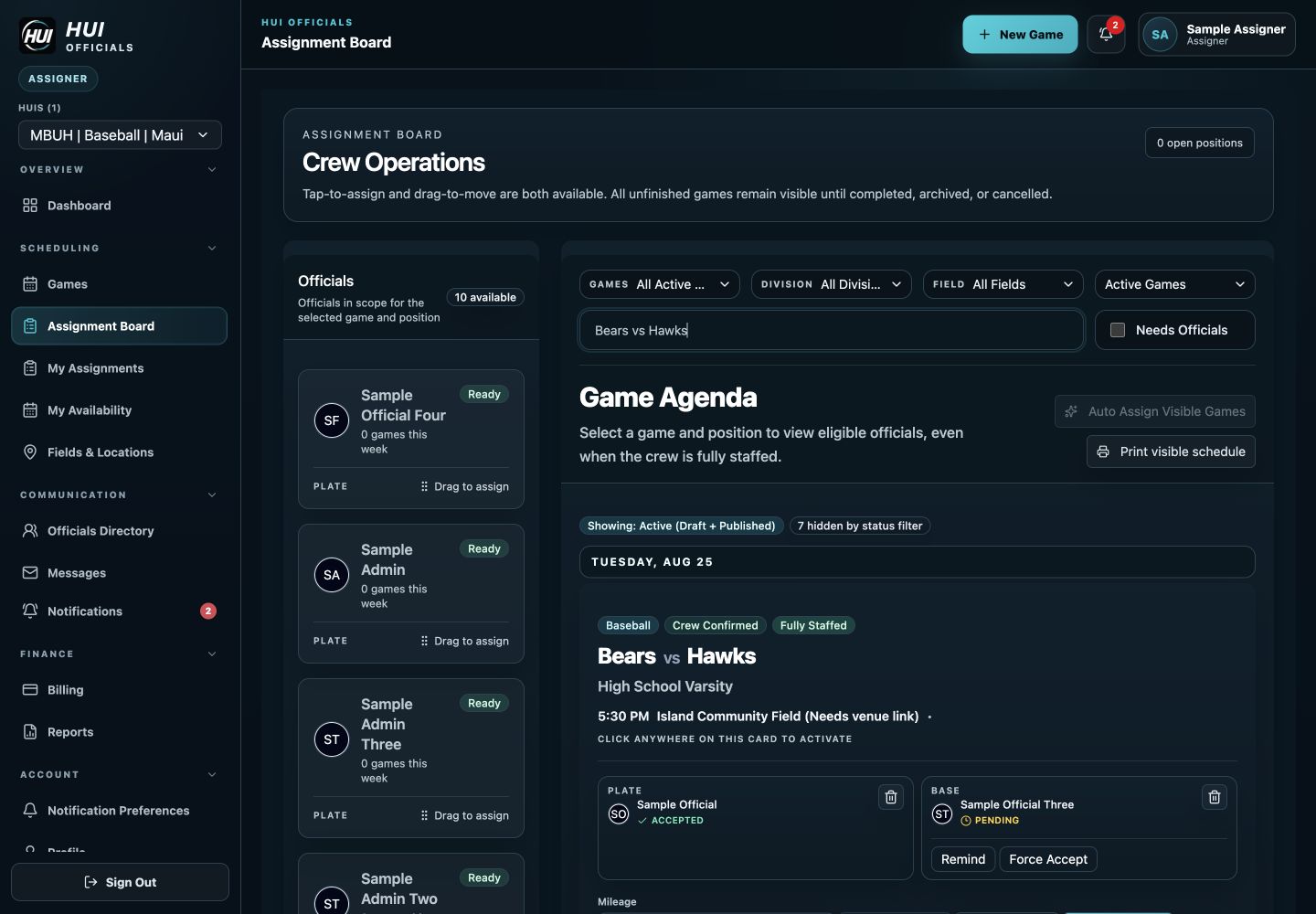
The assignment board brings eligible officials and game positions into one view. This anonymized baseball example shows plate and base assignments with separate accepted and pending responses. Other sports use their configured positions.
Example: one position is accepted and another is still pending. Follow up with the pending official on an active game; an accepted response does not need a reminder. If a position opens, review eligibility, availability, and overlapping work before selecting and publishing a replacement.
Review current plan details for your association before choosing.
Tell us about your sports, crew requirements, and season schedule.
Start with the schedule
HUI supports schedule intake from CSV, Excel, and PDF files with a review step before games are published. Assigners can confirm dates, times, sports, divisions, opponents, venues, fields, notes, and required positions while the schedule is still editable.
Once the game record is ready, that same record becomes the home for crew assignments, responses, changes, communication, mileage, fees, and reporting. The assigner does not have to recreate context in another tool after the first assignment is made.
Know who can work
Officials maintain availability while the HUI stores sport-specific eligibility and configured positions. Conflict checks surface overlapping work so the assignment decision starts with relevant context instead of a separate spreadsheet and a round of text messages.
Assigners can fill positions manually or use Auto Assign. The goal is not to remove assigner judgment; it is to make the pool of eligible, available officials clearer and reduce repetitive work.
Publish and track
Draft crew work stays separate from publication so officials are not notified accidentally. When assignments are published, officials can accept or decline, and assigners can distinguish pending, accepted, and declined responses at the game level.
Reminders focus on pending responses for active games. If an official declines or turns back an assignment, the opening stays visible and a replacement can be published without losing the rest of the crew or the game details.
Keep changes connected
Venue changes, schedule changes, postponements, and crew updates remain tied to the game. Accepted officials can see current crew and game information from the responsive web app, while assigners retain a clear view of open positions and response state.
After game day, the same assignment data supports fee, mileage, billing, payment, and reporting workflows when those features are enabled and configured by the HUI.
HUI checks overlapping assignments and availability before eligible officials are assigned.
Yes. Pending officials can receive reminders while accepted and declined responses remain distinct.
No. Draft assignment work stays quiet. Publishing sends eligible assignment notifications when the crew is ready.
Walk through a real position from draft to publication, response, replacement, and closeout. Check whether availability, eligibility, overlapping games, and response state are visible at the decision point. Review pricing and your required sports before choosing.